🎉 Special Discount! Use code WELCOME10 for 10% off all extensions!
EU Withdrawal Button for OpenCart: Rules and Setup | WebModernix
Does this apply to my OpenCart store?
If you sell online to consumers in an EU country, assume it does. It doesn't depend on the size of your shop or the platform it runs on.
It doesn't apply to business customers. B2B and wholesale buyers have no statutory right of withdrawal.
Some goods are exempt from the right of withdrawal. Article 16 of the Consumer Rights Directive lists them, and the ones that come up most in web shops are:
made-to-order goods, made to the customer's specifications, or clearly personalized goods
goods that spoil or expire quickly, such as fresh food or flowers
sealed goods that can't be returned for health or hygiene reasons once the seal is broken
sealed audio, video or software that the customer has unsealed
digital content the customer has started to download or stream, after agreeing to lose the right
Everything else in your catalog still needs the button. A shop that mostly sells exempt goods still needs it for the items that aren't.
Checklist: is your OpenCart store ready?
A "Withdraw from contract" button, or equally clear wording, that is easy to find on every page and doesn't get lost among the other footer links.
It works for guests without an account, if your shop allows guest checkout.
Customers can say which order, or which items, they are withdrawing from.
A second step where they see their name and email address and confirm the withdrawal.
An email receipt sent straight away, repeating what they submitted, with the date and time.
Exempt products, if you sell any, handled so customers can see which items can't be withdrawn.
Your terms and conditions still explain the right of withdrawal and who pays return postage, and include the EU model withdrawal form, as they had to before 2026.
The extension takes care of everything on this list except your terms and conditions, which stay your own text.
Cancellation or withdrawal?
Customers don't think in legal terms. Someone who ordered the wrong thing an hour ago wants to cancel. Someone who received the wrong size wants to send it back. Both will press whatever button they find.
Our withdrawal and cancellation extension for OpenCart treats these as two kinds of request. Before an order ships, the customer gets a "Cancel order" button: nothing has to come back, so it's usually quick to handle. After the order ships, they get the withdrawal button, with the 14-day period, the return of the goods and a refund. The order's status decides which one the customer sees, and both end up in the same place in your admin.
Why not use OpenCart's built-in Returns form?
OpenCart has a Product Returns form that guests can use too. It was built for sending back a faulty or wrong product, and it doesn't fit the withdrawal rules:
It is labeled "Returns", not as a withdrawal.
It takes one product per form, typed in by name and model.
It requires a return reason, while a withdrawal needs none.
There is no confirmation step.
It doesn't email the customer a receipt.
It knows nothing about the 14-day period, exempt products or cancellations.
You could rename it and edit the template, but you would still be missing the receipt, the deadlines and a form built around the whole order.
Adding the withdrawal button to OpenCart
The EU Withdrawal Button and Cancellation Manager is an OpenCart extension that adds the withdrawal function, a cancellation option for orders that haven't shipped, and an admin page where you handle every request. It runs on OpenCart 2.0 to 3.x with PHP 5.6 to 8.5 or newer, and it doesn't edit any core files.
Installing it
Upload the zip file in Extensions > Installer. On OpenCart 2.x the menu item is called Extension Installer.
Go to Extensions > Modifications and press Refresh.
Find the module in your modules list (Extensions > Extensions > Modules on OpenCart 3, Extensions > Modules on older versions), install it and click Edit.
Setting it up
Most settings come preset with sensible defaults, and the extension includes a built-in setup guide that walks you through the few things every store has to decide:
which information page holds your cancellation and withdrawal policy, so the request form can link to it
your store's timezone, for the dates and times on request pages and in emails
which order statuses mean an order hasn't shipped yet (cancellation), and which mean it has been sent or delivered (withdrawal)
for each payment method, whether the money goes back the same way it was paid or the customer is asked for bank details
your own withdrawal policy text for the top of the request page, which the extension leaves blank on purpose, because no generic legal text fits every shop
The extension stays switched off after installation, so nothing reaches your customers until you've been through these and turned it on.
Then open your store and check that the "Withdraw from contract" button shows in the footer. On the default theme and Journal 3 it's added automatically. If your theme doesn't show it, or you want it somewhere else, the button also comes as a module you can place through OpenCart's Design > Layouts or Journal's layout editor, and the request page has its own address that you can link from a menu or an information page.
What your customers see
They click "Withdraw from contract" in the footer, in their account or on the order's page. Before the order ships, the order's page shows "Cancel order" instead.
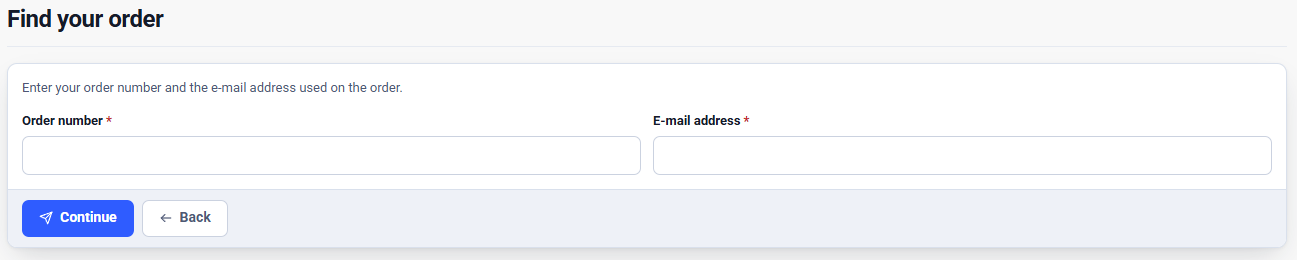
Signed-in customers pick the order. Guests enter the order ID and the email address used on the order. Depending on your settings, guests also confirm one detail from the order, such as the postcode, or open a link sent to that email address.
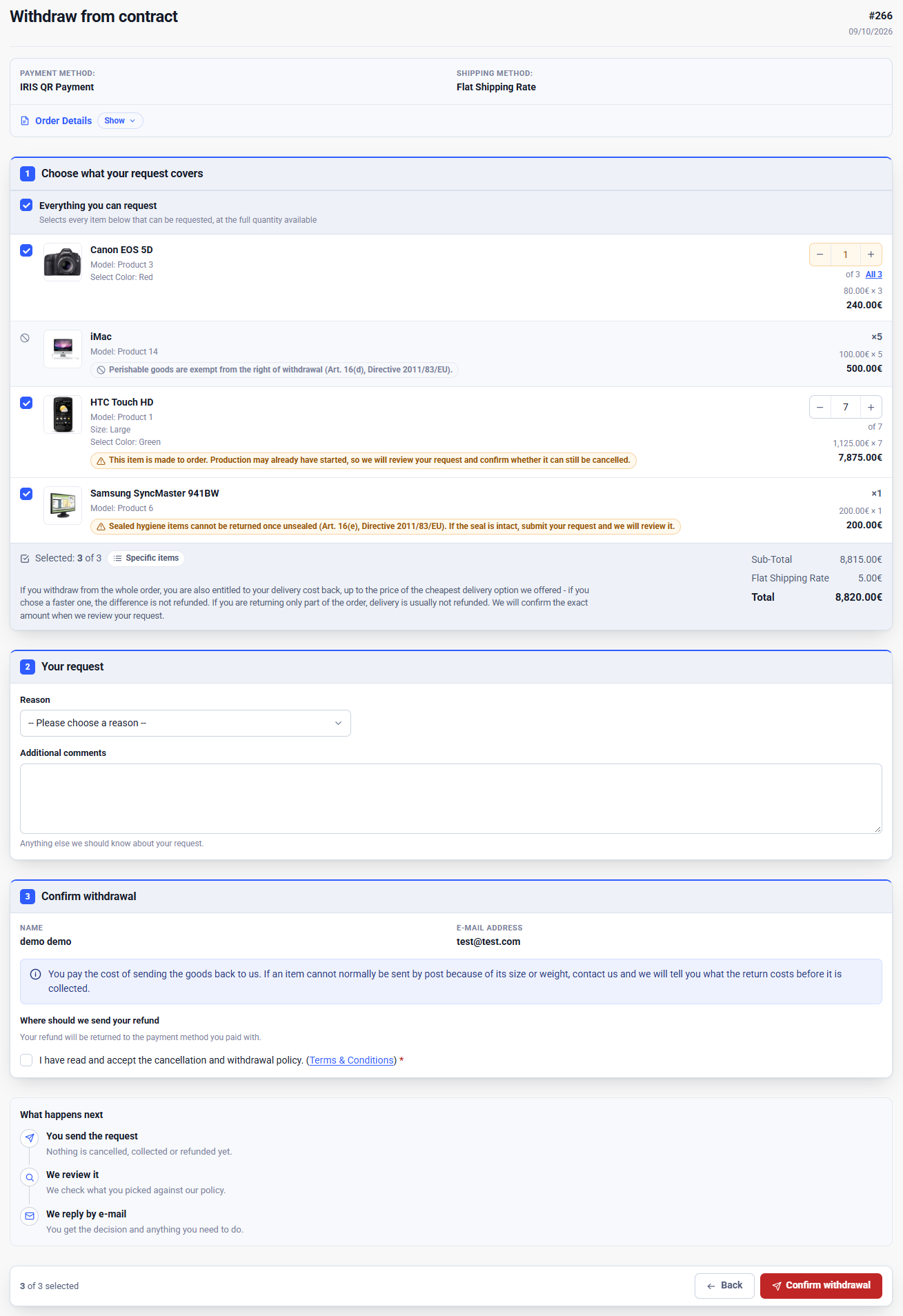
They choose the whole order, or specific items and quantities.
If you've switched them on, they pick a reason, add a comment or attach files. These are optional by default, since a withdrawal doesn't need a reason.
They see their name and email address and press "Confirm withdrawal".
The receipt arrives by email straight away, with a link to a tracking page. There they can follow the request, reply to you, and accept or decline an offer.
Guests open their order with the order ID and email address, without an account.
The request form, where customers choose items and quantities. Click the image to see the whole page.
The receipt confirms that the request arrived and will be reviewed. It doesn't say yet whether the withdrawal is valid, because you haven't checked it.
Every request, cancellation or withdrawal, lands on one page in the OpenCart admin, and the admin menu shows how many are open. From there you can:
search and filter by type, status, store, date, and customer or guest, or narrow the list down to the requests waiting on you
approve, reject, mark as awaiting return, mark as completed or cancel a request, each with an email you can edit before it goes out
send an offer, such as different items or a different refund amount, which the customer accepts or declines on the tracking page
write internal notes the customer never sees
read every email and change in the request's history, and in the order's history in OpenCart
export a request as PDF, HTML, text or CSV
The order page in the admin also shows the order's requests. If you like, a new request can move the order to a "Withdrawal Requested" or "Cancellation Requested" status, and the extension can create those two statuses for you.
How deadlines are counted
The 14 days start when the customer receives the goods. Stock OpenCart has no "Delivered" status, so many shops only know when an order was shipped. The extension works either way:
If you record deliveries, for example through a Delivered status set by your courier extension, it counts 14 days from delivery and refuses late requests. Store pickup and locker collection can count as delivery too.
If you only record shipping, it counts from the ship date plus your typical delivery time. Because that date is an estimate, a late request goes through with a flag for you to check instead of being refused. It is refused only once your longest delivery time has passed as well.
A deadline that falls on a Saturday or Sunday moves to the following Monday, following the EU rules on time limits (Regulation 1182/71). The same rules also extend a deadline that falls on a public holiday. Holidays differ from country to country, so the extension leaves those to you. You can change the 14 days, for example if you give customers 30 days to return goods.
Custom rules for products and customers
Not every product in a store follows the same rules. A shop that sells T-shirts next to custom-printed mugs, or fresh coffee next to coffee machines, needs a different answer for each. Custom rules give you that answer without changing the products themselves.
Each rule has two parts: what it targets, and what happens to the items it matches.
Targets. A rule can target products, categories, manufacturers, customer groups and countries. Each target can include or exclude, so "every category except Spare Parts" is as easy to set up as "only Spare Parts". When a rule has several targets, all of them have to match, so "shoes or bags, on orders with a Greek address" is a single rule. Rules can also tell guests apart from customers with an account, and check the country against the shipping address, the payment address or either.
Outcomes by order status. For each order status, the rule decides what happens to a matching item. It can:
allow it, so the item can be requested as usual
allow it with a warning: the customer sees your message and ticks a box to confirm they've read it, and you make the call when you review the request. This is for exemptions the extension can't check by itself, such as whether a seal has been broken.
block it: the item is shown but can't be selected, with your message next to it
Each status can also have a day range, counted from the day the order entered that status. One rule can then say, for example: delivered up to 14 days ago, allowed. Delivered 15 to 21 days ago, allowed with a warning. Anything older, blocked. Each outcome carries a message in each of your languages, shown next to the item and also available in emails, and it can carry its own fee.
Rules are checked item by item, so a mixed order is handled line by line. A customer who bought a laptop and a pair of sealed earphones can send back the laptop, while the earphones show your note about broken seals.
You can add as many rules as you need and arrange them in any order, with general rules first and exceptions after them. The last rule that matches an item wins. A rule can be switched off without deleting it, and if you turn on a rule with no targets, the extension warns you that it applies to every item in the store.
The extension also has built-in example rules for the most common exemptions in Article 16, ready to add and adjust:
Made-to-order or personalized: allowed with a warning before shipping, since production may already have started, and blocked once shipped.
Perishable: always blocked.
Sealed hygiene goods: allowed with a warning, since only the customer knows whether the seal is intact.
Digital content: allowed with a warning, since the extension can't tell whether the download has started.
Each example comes with a customer message that cites the relevant article of the directive. You only add the products or categories it should cover.
Restricting the button by customer group or country
Apart from custom rules, you can restrict cancellations and withdrawals separately by customer group, and by country, zone or geo zone. A restriction can allow the option, show a warning first, block it with a message, or hide the button altogether. Hiding is meant for customers who never had the right in the first place, such as wholesale buyers: the button disappears for them, and a request is still refused if they reach the page another way. For consumers, blocking with a message is usually the better choice, because it tells them why instead of leaving them guessing.
Items another request already covers can't be requested twice, unless that request was rejected or canceled.
Fees
The extension can show the customer a fee when they make a request. There is none by default. You can set one for cancellations and another for withdrawals, in one of three forms:
a percentage of each item, charged only on the quantity requested, so for 1 of 5 units it's charged on 1
a fixed amount per item, whatever the quantity
a fee whose amount you confirm when you review the request, for charges you can't work out in advance
Custom rules can set their own fee per product, category or manufacturer, by order status and day range. The customer sees the total before confirming and ticks a box to acknowledge it. The extension never charges or deducts the fee itself. You settle it when you handle the request, and you can reduce or waive it.
Fees are most often wanted on cancellations: a made-to-order product that is already in production, or a large wholesale order that has already been packed. That is also where the law needs the most care.
The law on fees. In the EU, a consumer can withdraw from the moment the order is placed until 14 days after delivery, and inside that time they can't be charged a fee for doing so. Cancelling before the order ships falls inside that time too. So a fee only comes into question for goods that are exempt from the right, for business customers, for returns you accept after the 14 days, or for shops selling outside the EU. Even then, it has to be in your terms and allowed where you sell. The extension reminds you of this when you set a fee.
For withdrawals, the default fee comes with a fee-free period, set to 14 days out of the box and counted on the same clock as the deadline. With 30-day returns, the default fee then only applies to requests made on days 15 to 30. A fee you set in a custom rule follows that rule's own day range instead, so count that range from delivery and start it after day 14.
Return postage is a separate matter. The customer pays for sending the goods back, but only if you told them so before they ordered. The extension comes with a notice on the request page saying the customer pays for returns, which you can change if you pay for them yourself.
Refunds
The extension never moves money. You refund through your payment provider or bank, as you do now. What the extension does is collect what you need to make the refund. For each payment method, and separately for cancellations and withdrawals, you decide how the refund works:
Back the way it was paid, for example to the card or PayPal account. The customer sees a note saying so.
To an account the customer gives you: the form asks where to send the money. This is for orders paid by cash on delivery or bank transfer. IBANs are checked for the right format.
Emails
13 ready-made email templates, one for each step, with a visual editor, tokens for order and request details, and conditional blocks. You can preview each one with a real order or with sample data.
Cancellations and withdrawals have their own emails, so each can say something different.
New requests and customer replies can go to several shop addresses, and you can keep a copy of every email sent to customers.
Languages and countries
The withdrawal button is an EU rule, but a shop selling across Europe deals with many languages, and many shops sell beyond the EU as well. The extension isn't tied to one country or one language.
Languages
Every text a customer sees can be written separately for each language installed in your store. That covers the button, the form, the tracking page and every email.
Several languages come translated out of the box. Any other language starts with the default text in place, so nothing shows up blank, and you can translate it or write your own whenever you're ready.
The extension can find texts that are still empty in a language and copy text from one language to another, and it previews each text on the real storefront pages while you edit.
Each email can have its own text per language, or one text for all languages.
Texts in non-Latin alphabets work just as well.
Markets
The button's wording, your legal text and your policy page can follow the law of each country you sell to. German law, for example, words the button "Vertrag widerrufen".
Restrictions by country, zone or geo zone let a single store treat countries differently. Customers in the EU get the withdrawal button, while customers elsewhere see a message you write, or no button at all.
The withdrawal period, the weekend rule and fees are all adjustable, so the same extension can run a voluntary returns policy in a country with no legal right of withdrawal.
Refund options are yours to define, each with its own fields, so you aren't limited to bank transfers by IBAN.
Deadlines take time zones into account, so a request is never cut off early because your customer and your server are in different zones.
In a multi-store setup, each store has its own settings, so a store for each country can follow its own rules in its own language. You can export one store's setup, import it into another, and then change only what differs.
Fitting it to your store
Most of the settings exist because no two stores work the same way. A few examples of how different shops set it up:
Clothing and shoes with 30-day returns. The withdrawal period goes up to 30 days, with no fee. Customers can pick reasons like "Too small" and "Too big", so you can see which products have sizing problems.
Made-to-order furniture or printed products. A custom rule lets customers cancel while the item is in production and blocks withdrawal once it has shipped. You can add a fee for materials already used, if your terms and local law allow it. Made-to-order here means made to the customer's own specifications, such as their measurements or design. A standard product that you simply build after the order comes in isn't exempt.
Food, cosmetics and pharmacy products. Perishables are blocked. Sealed hygiene products show a warning, and you check the seal when they come back.
Software, e-books and other downloads. Digital products show a warning, or are blocked by category if your checkout records the customer's consent to lose the right.
Retail and wholesale in one shop. The wholesale customer group is either hidden from the button, or kept, with a custom rule that adds a fee for business buyers only.
Other things you can change:
Where the button appears: footer link, footer button, a module you place yourself, the customer account, the order page, the order confirmation email, and a standalone page with its own short URL.
How it looks: the button's text, colors and CSS, and storefront pages in light mode, dark mode, or following the customer's device.
What the form asks: separate reason lists for cancellations and withdrawals, a comment box and file uploads, each off, optional or required. These can also be set per reason, so "Damaged or defective" can ask for a photo while other reasons don't.
What happens in OpenCart: an optional automatic order status change, and which steps are written to the order history.
Security
The withdrawal page is open to anyone, guests included, so it has to protect your customers' orders and your mailbox. The extension:
Checks who's asking. Signed-in customers only see their own orders, and guests have to prove the order is theirs.
Gives nothing away. The guest form answers the same way whether the details match or not, so it can't be used to find out which orders or email addresses exist.
Slows down guessing. After a few failed attempts for one email address, further tries are blocked for seconds, then minutes, then hours. Repeated failures are written to the extension's log with the IP address, so you can see an attack when one happens.
Limits emails and requests. Verification emails per address are capped, so nobody can use your shop to flood a customer's inbox, and each email address can only send a limited number of requests per hour.
Signs its links. Magic links, valid for 30 minutes, and tracking links are signed, so they can't be forged or edited to open someone else's request.
Separates reading from acting. Anyone with a tracking link can read the request, but replying, answering an offer or cancelling the request needs a login or a fresh magic link. A forwarded email isn't enough to act on someone else's request.
Protects bank details. Guests can only enter bank details after opening a link sent to the order's email address.
Stops forged and automated submissions with CSRF protection, a honeypot field that catches bots, and your store's own CAPTCHA if you have one enabled.
Checks everything again on the server. Hiding a button or editing the page in the browser doesn't get around a rule, because the same checks run when the request is sent.
Treats customer input as text. What customers type is shown as plain text in your admin and in emails, so it can't be used to inject code.
Keeps your records. Uninstalling the extension doesn't delete any requests.
Frequently asked questions
Is the withdrawal button mandatory for OpenCart shops?
Yes, if the shop sells to consumers in the EU. The rule applies from 19 June 2026, whatever platform the shop runs on. OpenCart doesn't add the button by itself, so you need an extension, such as our EU withdrawal button for OpenCart, or custom development.
When did the withdrawal button become mandatory?
From 19 June 2026. EU countries had until 19 December 2025 to write the rule into their own laws, which apply from 19 June 2026, so it's worth checking the rules in the countries you sell to.
What should the button say?
The directive asks for "withdraw from contract here" or an equally clear phrase. Countries word it in their own language, such as "Vertrag widerrufen" in Germany. The extension's button reads "Withdraw from contract" out of the box, and you can change the wording for every language.
Where should the button go?
Somewhere customers can easily find it for the whole withdrawal period. The footer is the usual place, because it shows on every page. The extension adds the button there, and also in the customer account and on each order's page.
Is a link to my contact page or support email enough?
No. The function has to let the customer withdraw on the site, in the steps described above, and then send them a receipt. An email address or a general contact form doesn't do that.
My shop only sells to businesses. Do I need it?
No. The right of withdrawal is for consumers. If you sell to both, you need it for your consumer customers, and you can hide it from your business customer groups.
Do customers need an account to withdraw?
No. Guests use the order ID and the email address on the order.
How long do customers have to withdraw?
14 days from the day they receive the goods, or the last parcel of the order. A deadline that ends on a weekend moves to the Monday. You can give customers longer if you want to.
Can customers withdraw from only part of an order?
Yes. They can choose individual items and quantities. Items that another request already covers can't be claimed twice.
Do I have to accept every withdrawal?
If it's sent within the deadline and the products aren't exempt, yes. Those are the two things you check, and the extension shows you both. If goods come back used more than needed to try them, the withdrawal still stands, but you may be able to deduct something for the loss in value.
Does it refund customers automatically?
No. You decide on each request and make the refund yourself. The extension tells the customer how they will be refunded and asks for bank details when they're needed.
Can customers cancel an order before it ships?
Yes. You choose which order statuses mean "not shipped yet", and those orders get a "Cancel order" button instead. Cancellations go to the same admin page as withdrawals.
Can I charge a fee for cancelling an order?
The extension can show one, as a percentage, a fixed amount or an amount you confirm later. For EU consumers, though, a fee generally isn't allowed from the moment they order until 14 days after delivery, and that includes cancellations. It only comes into question for exempt goods, business customers, returns after the 14 days, or sales outside the EU, and even then it has to be in your terms and allowed where you sell.
Is it safe to let guests withdraw without an account?
Yes. Guests have to match the order ID and the email address on the order, and the extension adds the protections described under Security above.
Does it work with Journal 3 or my theme?
The default theme and Journal 3 work out of the box. If the button doesn't appear on your theme, contact us and we'll add support for it free of charge.
Which OpenCart versions are supported?
OpenCart 2.0.x, 2.1.x, 2.2.x, 2.3.x and all 3.x, on PHP 5.6 to 8.5 or newer.
Does it change OpenCart's core files?
No. It installs through the Extension Installer with one OCMOD, and no core files are edited.
Can I try it before buying?
Yes. The demo links above open the withdrawal page as your customers see it, the admin dashboard and the settings page.
This article describes the EU rules in general terms and isn't legal advice. National laws can go further than the directive, so check the rules in the countries you sell to, or ask a lawyer about your shop.